other
Where to Find Pre-built LLM Inference Models for Chatbots (2026 Engineering Guide)
February 21, 2026
In the chatbot development lifecycle, the gap between "downloading a model" and "serving a conversation" is a chasm filled with engineering debt. Raw model weights (typically `.safetensors` files from Hugging Face) are stateless and unoptimized. They lack the memory management logic required for multi-turn conversations, RAG (Retrieval-Augmented Generation), and high-concurrency serving.
To build scalable chatbots in 2026, engineers are turning to Managed Model Libraries. These platforms serve "Pre-built Engines"—models that have already been compiled into optimized execution graphs, integrated with PagedAttention for KV-cache management, and deployed on high-bandwidth hardware. This guide evaluates where to find these models and how to select the right source for your latency and throughput requirements.
The Three Sources of Inference Models
When sourcing models for chatbot applications, you effectively have three choices, ranging from total control (and high complexity) to zero control (and high cost).
Source 1: Managed Model Libraries (Recommended for Production)
Providers like GMI Cloud, Together AI, and Fireworks.ai.
- What you get: An HTTPS API endpoint compatible with the OpenAI SDK.
- Underlying Tech: The model is already loaded onto HBM3e memory on NVIDIA H200 GPUs. It runs on an optimized engine (like customized vLLM or TensorRT-LLM) with continuous batching enabled.
- Chatbot Advantage: Native support for long-context (128k+) and high-concurrency handling without OOM (Out of Memory) errors.
Source 2: Raw Model Hubs
Repositories like Hugging Face or ModelScope.
- What you get: Static weight files (Parameters).
- Engineering Load: You must provision infrastructure (e.g., GMI Cloud Bare Metal), install drivers, configure Docker, manage CUDA versions, and manually implement the serving API.
- Chatbot Disadvantage: No built-in state management. You must build your own caching layer for chat history.
Source 3: Proprietary SaaS
OpenAI (ChatGPT), Anthropic (Claude).
- What you get: A black-box API.
- Chatbot Disadvantage: Zero visibility into the infrastructure. High latency variance. Data privacy concerns for enterprise use cases.
Technical Criteria for Chatbot Models
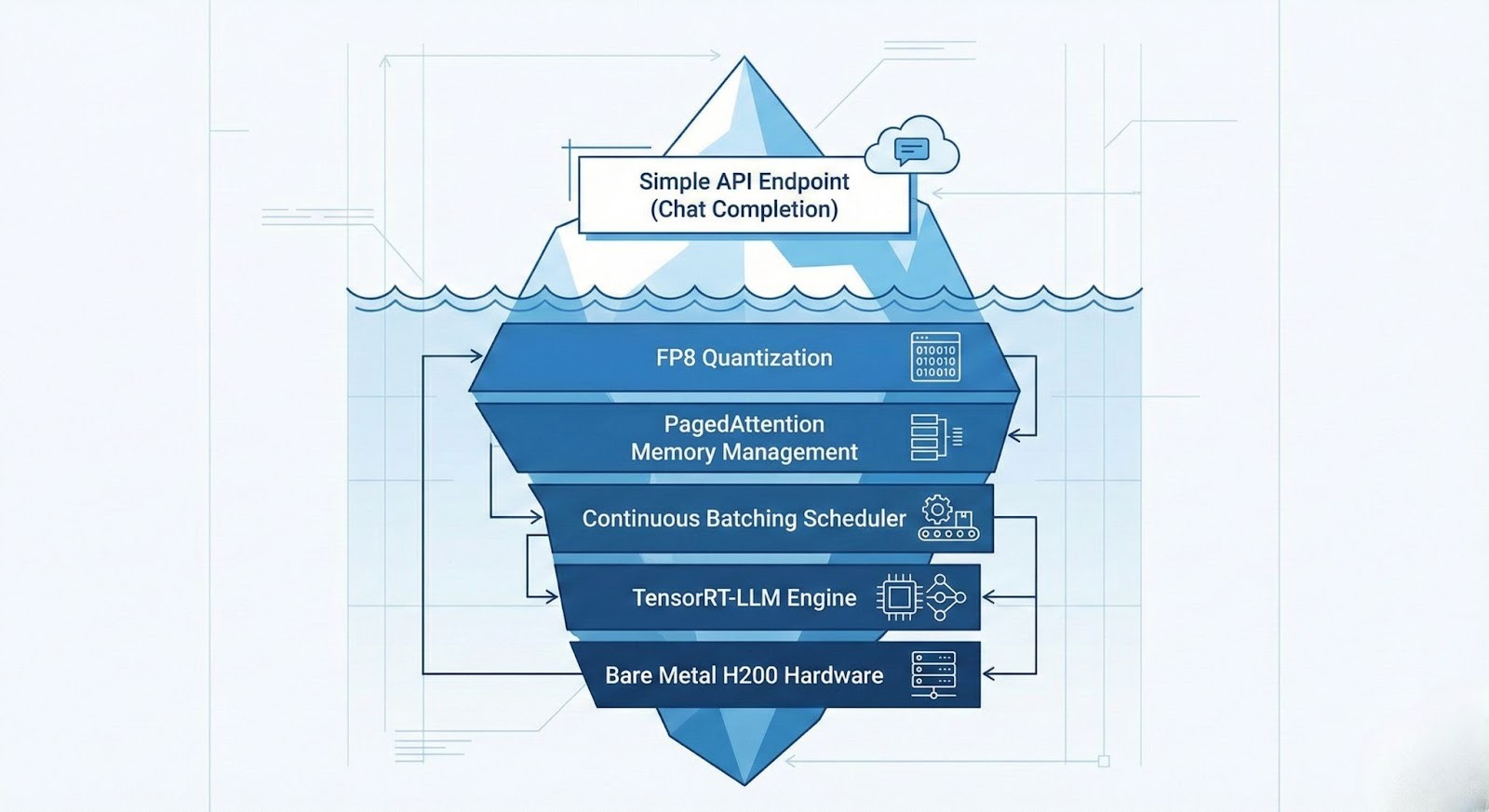
Not all pre-built models are suitable for chatbots. Conversational AI places specific demands on the inference infrastructure that differ from offline batch processing.
Time to First Token (TTFT) and Perceived Latency
For a chatbot to feel "real-time," the TTFT must be under 200ms. This phase involves processing the system prompt plus the user's history.
GMI Cloud’s Model Library optimizes TTFT using FP8 Quantization on H200s. By reducing the precision of matrix multiplications to 8-bit, we double the compute throughput of the prefill phase, ensuring instant responsiveness even with long chat histories.
KV Cache and Multi-Turn State
In a multi-turn conversation, the model must "remember" previous turns. Technically, this involves storing the Key-Value (KV) states of past tokens in GPU memory.
A standard 70B model with a 4k context window can consume over 3GB of VRAM per user just for the KV cache. On a standard GPU (A100 80GB), this limits you to ~20 concurrent users. GMI Cloud’s H200s (141GB VRAM) combined with PagedAttention allow for over 100 concurrent users per GPU, drastically reducing the cost per active chat session.
Top Pre-built Models for Chatbots in 2026
The GMI Cloud Model Library curates specific models that excel in conversational nuances and instruction following. These are available for immediate deployment.
DeepSeek V3 (671B MoE)
The current state-of-the-art for open-source reasoning. Its Mixture-of-Experts architecture activates only ~37B parameters per token, making it surprisingly fast for generation while retaining massive knowledge.
- Best For: Coding assistants, technical support bots, complex reasoning tasks.
- Deployment: Requires multi-node H200 clusters. GMI Cloud manages the interconnect over 3.2 Tbps InfiniBand.
Llama 3 (70B & 8B)
Meta’s flagship model offers the best balance of general knowledge and speed.
- Best For: General customer service, roleplay bots, summarization.
- Optimization: Served in FP8 on GMI Cloud for maximum throughput.
Qwen 2.5 (72B)
Superior performance in multi-lingual contexts and mathematical logic.
- Best For: Global enterprise chatbots serving Asian and Western markets simultaneously.
Comparative Analysis: Optimization Stack
The difference between a "Raw Model" and a "Pre-built Engine" lies in the compilation stack. The table below details what GMI Cloud adds to the raw weights found on Hugging Face.
Table 1: Optimization Stack Comparison
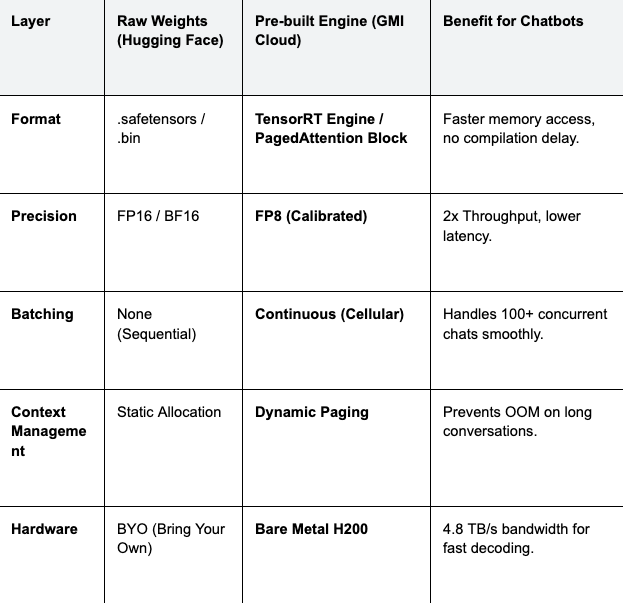
Cost Implication: By using GMI Cloud's pre-built engines with PagedAttention, you avoid the "internal fragmentation" of GPU memory. This effectively increases your hardware utilization by 20-30%, directly lowering the infrastructure bill for high-traffic chatbots.
Integration Guide: From API to Chatbot
Integrating a pre-built model from GMI Cloud is designed to be frictionless for developers accustomed to the OpenAI standard.
Python Implementation with Streaming
Chatbots require streaming (sending tokens as they are generated) to minimize perceived latency. GMI Cloud's inference endpoints support Server-Sent Events (SSE) for robust streaming.
from openai import OpenAI
# Initialize client pointing to GMI Cloud's Inference Engine
client = OpenAI(
base_url="https://api.gmicloud.ai/v1",
api_key="YOUR_GMI_API_KEY"
)
# Chat history maintenance is handled by your application logic
messages = [
{"role": "system", "content": "You are a helpful banking assistant."},
{"role": "user", "content": "How do I reset my password?"}
]
# Request streaming completion from Llama 3 70B
response = client.chat.completions.create(
model="llama-3-70b-instruct",
messages=messages,
temperature=0.1,
max_tokens=500,
stream=True # Critical for chatbot UX
)
print("Assistant: ", end="")
for chunk in response:
if chunk.choices[0].delta.content:
print(chunk.choices[0].delta.content, end="", flush=True)
Infrastructure Considerations for RAG Chatbots
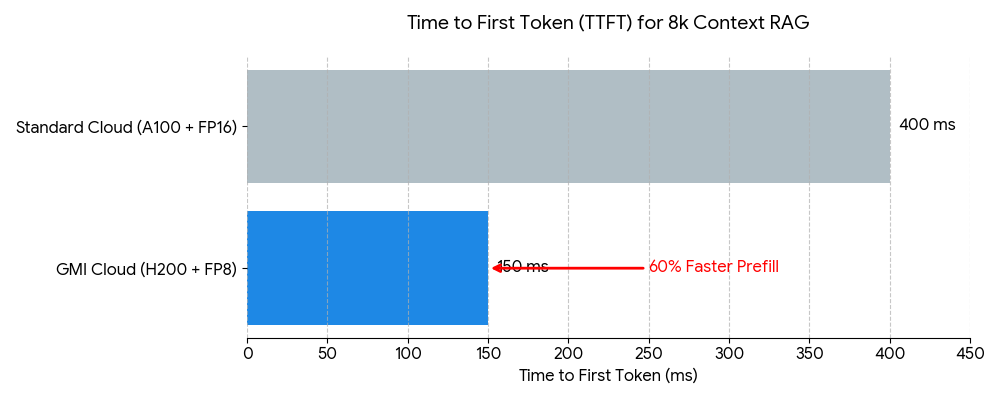
Modern enterprise chatbots often use RAG (Retrieval-Augmented Generation) to access proprietary data. This involves injecting retrieved documents into the context window.
This process places immense pressure on the GPU's memory bandwidth during the prefill phase. A standard RAG prompt might be 4,000 to 8,000 tokens long. Processing this on an A100 can take 200-300ms. On a GMI Cloud H200, thanks to 4.8 TB/s bandwidth, this prefill time is reduced by approximately 40%, keeping the interaction feeling snappy.
Furthermore, GMI Cloud's Inference Engine supports Prefix Caching (or Prompt Caching). If multiple users ask questions about the same document (system prompt), the KV cache for that document is computed once and shared across requests, saving compute cycles and further reducing latency.
FAQ: Selecting Chatbot Models
Q: Should I use a 7B, 70B, or 671B model for my chatbot?
It depends on complexity. For simple FAQ bots, Llama 3 8B (served on H200 for extreme speed) is sufficient and cheapest. For complex reasoning or RAG with messy data, Llama 3 70B or DeepSeek V3 is required. GMI Cloud allows you to hot-swap models via API to test what works best.
Q: How do I handle data privacy with pre-built models?
Use Dedicated Endpoints. While our serverless API is secure, enterprise customers often prefer Dedicated Instances. This gives you a physically isolated H200 cluster where only your model and data reside, satisfying strict GDPR and HIPAA compliance requirements.
Q: Can I fine-tune a pre-built model on my chat logs?
Yes. You can use GMI Cloud’s Cluster Engine to fine-tune a base model (e.g., Llama 3) on your proprietary conversation data. Once trained, the model can be hosted as a private custom endpoint with the same optimization stack as our public models.
Q: What is the cost difference between Self-Hosted and Managed?
Managed is often cheaper at scale. Self-hosting requires paying for GPU idle time and engineering salaries. GMI Cloud’s managed endpoints offer auto-scaling to zero and high utilization rates, optimizing the Total Cost of Ownership (TCO).
What's next
- Explore the Model Library to test Llama 3 and DeepSeek V3 instantly.
- Review the Pricing Guide for H200 instances.
- Read our technical blog on Chatbot Inference Patterns for deep architectural insights.
Colin Mo
Build AI Without Limits
GMI Cloud helps you architect, deploy, optimize, and scale your AI strategies
