ai-training-scale
Automating model retraining workflows with GPU cloud infrastructure
GMI Cloud enables automated model retraining with GPU infrastructure, ensuring AI systems stay accurate as data evolves. Through orchestration, autoscaling, and monitoring, enterprises can retrain models proactively, efficiently, and cost-effectively.
October 31, 2025

This article explores how enterprises can automate model retraining workflows using GPU cloud infrastructure to maintain accuracy, reduce drift, and lower operational costs. It explains how orchestration, auto-scaling, and monitoring transform retraining from a manual process into a proactive, scalable system that ensures continuous model performance.
What you’ll learn:
• Why automated retraining is essential for long-term model accuracy
• The key triggers that initiate retraining (performance drop, data drift, schedules)
• How GPU cloud infrastructure supports elastic scaling and cost efficiency
• Core components of an automated retraining pipeline (monitoring, orchestration, versioning)
• How to manage large-scale data efficiently during retraining cycles
• Strategies for balancing performance, agility, and compute cost
• The role of CI/CD and MLOps integration in continuous retraining
• How automation strengthens security, compliance, and operational resilience
AI models don’t stay accurate forever. Data evolves, user behavior shifts, and the real world rarely looks like the training set that models were built on. What performs well today may degrade tomorrow – sometimes gradually, sometimes overnight. That’s why model retraining isn’t an afterthought; it’s a core part of maintaining production AI systems at scale.
But while most teams understand the importance of retraining, far fewer have automated it effectively. Manual retraining pipelines can be slow, expensive and prone to failure. Automating these workflows – particularly with GPU cloud infrastructure – transforms retraining from an operational burden into a continuous, predictable and cost-efficient process.
Why automated retraining matters
AI systems are only as good as the data they see. When distributions shift, features become less relevant, or new patterns emerge, model accuracy can degrade significantly. This phenomenon – commonly called model drift – has real consequences: lower conversion rates in recommendation systems, less reliable predictions in logistics, reduced accuracy in fraud detection, or even critical failures in domains like healthcare and finance.
Manual retraining typically involves several steps: monitoring performance, identifying drift, retriggering data pipelines, allocating compute, running training jobs, and pushing new versions into production. Each step introduces potential delays and human error. Automated retraining eliminates most of this friction by continuously monitoring and triggering workflows based on defined thresholds, ensuring models stay accurate without constant engineering intervention.
The complexity of retraining at scale
Retraining isn’t just a matter of “pressing a button.” For enterprise workloads, it often involves:
- Ingesting and preprocessing new data
- Running multiple experiments to fine-tune hyperparameters
- Validating model performance against production metrics
- Ensuring compatibility with downstream systems
- Coordinating rollouts and version control
Doing this efficiently requires infrastructure that can scale up to handle compute-intensive training runs – sometimes involving multiple GPUs and distributed training – and scale back down once the work is done. On-prem environments often lack this elasticity, making GPU cloud an ideal foundation.
Key triggers for automated retraining
A well-designed retraining system doesn’t retrain arbitrarily. It responds to meaningful signals that indicate when a model is starting to drift. Common triggers include:
- Performance thresholds: When key metrics like accuracy, F1 score or AUC drop below a set level, retraining is automatically initiated.
- Data drift: Shifts in input feature distributions – for example, seasonality effects or changing user behavior – can trigger new training cycles.
- Scheduled intervals: Some models benefit from periodic retraining (e.g., daily, weekly or monthly) to incorporate the latest data without relying solely on drift detection.
- Event-driven retraining: Specific business events, such as product launches or regulatory changes, can also be used as triggers.
Combining these signals ensures retraining happens only when necessary, keeping infrastructure costs under control.
GPU cloud as the backbone of automated retraining
Automating retraining requires infrastructure that can adapt quickly. GPU cloud enables teams to:
- Provision compute on demand: Instead of maintaining idle hardware, teams can spin up GPU clusters automatically when retraining is triggered, then deprovision once the job finishes.
- Scale horizontally: Large models can be retrained faster by distributing workloads across multiple GPUs.
- Maintain consistent environments: Containerized workflows ensure the same dependencies and configurations are used across training cycles, reducing the risk of inconsistencies.
- Integrate with orchestration tools: GPU cloud can plug directly into Kubernetes, workflow orchestrators, and CI/CD pipelines, enabling fully automated end-to-end retraining loops.
This dynamic model keeps costs manageable while ensuring models are always trained on fresh, relevant data.
Automation building blocks
An effective automated retraining pipeline typically includes these components:
- Monitoring and alerting: Real-time metrics on model performance are collected and compared against thresholds. When drift is detected, an alert or automated trigger initiates the retraining process.
- Data validation and preprocessing: Incoming data is automatically checked for quality, schema alignment and anomalies before entering the training pipeline.
- Orchestrated training jobs: GPU cloud infrastructure spins up training clusters, runs jobs, and scales resources as needed.
- Evaluation and approval gates: Automated evaluation ensures only models that outperform the current production version move forward.
- Versioning and deployment: New models are versioned and either rolled out gradually (canary deployments) or fully pushed to production.
- Rollback mechanisms: If post-deployment monitoring detects regressions, the system automatically reverts to the previous version.
With these building blocks, retraining becomes a predictable process rather than a fire drill.
Handling large-scale data efficiently
Retraining at scale often means processing massive datasets. Moving all of that data back and forth between storage and compute can introduce latency and costs. GPU cloud deployments mitigate this by tightly coupling compute and high-bandwidth storage, ensuring that data is available to training jobs without unnecessary transfer delays.
Distributed data pipelines also play a key role. By splitting data ingestion and preprocessing into parallel streams, the system can feed GPUs continuously, maximizing utilization and minimizing idle time.
Managing cost while staying agile
A common concern with frequent retraining is cost. GPU cycles are expensive, and running them continuously can quickly consume budgets if not managed carefully. Automation helps balance performance and efficiency by:
- Using on-demand GPUs only when retraining is triggered, rather than maintaining persistent clusters.
- Scheduling retraining jobs during off-peak hours to take advantage of lower pricing.
- Allocating reserved GPU capacity for predictable workloads and bursting into on-demand capacity when needed.
- Implementing policies that prioritize retraining jobs with the highest business impact.
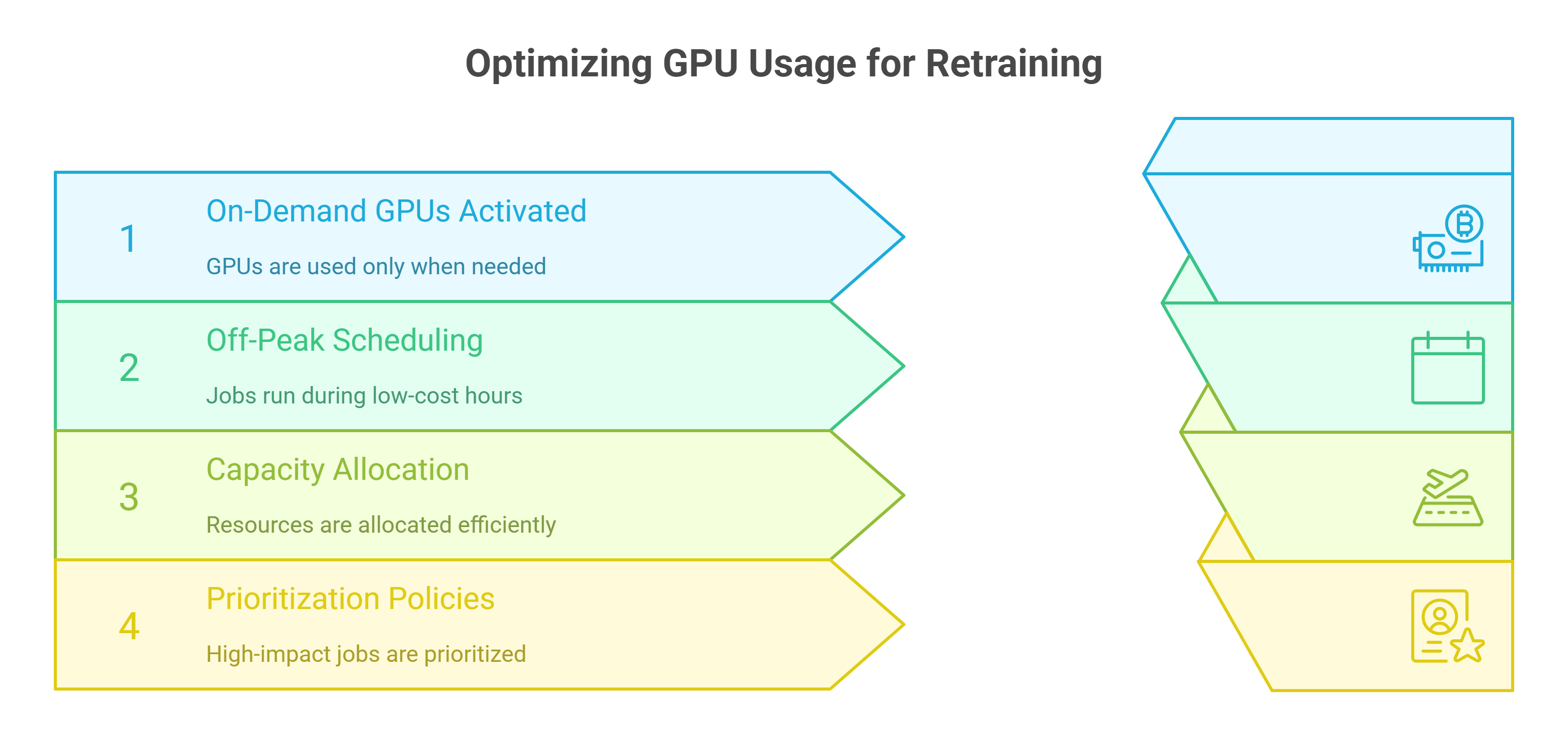
This combination of elasticity and governance ensures enterprises maintain agility without overspending.
Integrating retraining with CI/CD and MLOps
Automated retraining doesn’t operate in isolation. It integrates tightly with CI/CD pipelines and broader MLOps processes.
When a retraining trigger fires, the pipeline can automatically fetch the latest data, rebuild and test the model, push artifacts to a registry, and update deployment configurations. By connecting retraining to the same automation fabric as model delivery, teams avoid duplication of effort and ensure new versions are delivered to production reliably.
Security and compliance considerations
Retraining often involves sensitive data. Automated workflows must maintain compliance and security at every step. Access control, encryption and audit logging are essential for protecting both data and models.
GPU cloud environments that support compliance frameworks such as SOC 2 make it easier to build pipelines that meet enterprise security standards without adding manual checkpoints that slow down the process.
Evolving retraining strategies
Not every model requires the same retraining cadence. Recommendation engines may need frequent updates to stay relevant, while other models may remain stable for months. A mature retraining strategy evolves over time, incorporating:
- Adaptive retraining frequency based on real-time monitoring.
- Prioritization of high-impact models to optimize resource allocation.
- Selective retraining of only the affected components in modular model architectures.
- Integration of active learning techniques to focus retraining on the most informative data.
These refinements ensure retraining isn’t just automated – it’s also intelligent.
Rethinking model maintenance at scale
Automating model retraining with GPU cloud isn’t just about efficiency. It fundamentally changes how organizations think about maintaining AI systems. Instead of periodically reacting to drift and scrambling to fix performance regressions, teams operate on a proactive cycle of continuous improvement.
This shift reduces downtime, improves prediction quality, and frees up valuable engineering time to focus on innovation rather than maintenance. It also builds a more resilient operational foundation – one where retraining is predictable, scalable and financially sustainable.
Frequently Asked Questions About Automating Model Retraining with GPU Cloud Infrastructure
1. Why do production models need automated retraining in the first place?
Because data changes. As user behavior and real-world conditions evolve, model accuracy can degrade (often called model drift). Automated retraining monitors performance and data distributions, then triggers fresh training when thresholds are crossed, keeping predictions reliable without constant manual effort.
2. What signals should trigger an automated retraining cycle?
Common triggers include performance drops on key metrics (for example, accuracy or F1 score), detected data drift in input features, time-based schedules (daily, weekly, or monthly), and business events such as product launches or regulatory changes. Combining these signals ensures retraining happens when it is actually needed, not arbitrarily.
3. How does GPU cloud infrastructure make retraining faster and more cost-effective?
GPU cloud lets teams provision compute on demand, scale horizontally across multiple graphics processing units, and run containerized, reproducible environments. When a trigger fires, orchestration tools spin up training jobs, autoscale resources during the run, and deprovision them when complete—so you pay only for what you use.
4. What are the essential building blocks of an automated retraining pipeline?
Effective pipelines include real-time monitoring and alerting, automated data validation and preprocessing, orchestrated training jobs on GPU cloud, automated evaluation and approval gates, versioning and controlled rollout (including canary deployments), and automatic rollback if post-deployment metrics regress.
5). How can teams control costs while retraining frequently?
Use elasticity and simple governance: launch on-demand graphics processing units only when a trigger fires, schedule jobs during off-peak hours, reserve baseline capacity for predictable needs, burst for spikes, and prioritize retraining jobs with the highest business impact. This aligns spending with actual demand.
6. How does automated retraining integrate with the wider delivery process and compliance needs?
Retraining can plug directly into continuous integration and continuous delivery workflows and modern machine learning operations: fetch latest data, rebuild and test the model, push artifacts to a registry, update deployments, and monitor live performance. Security and compliance are supported through access control, encryption, audit logging, and GPU cloud environments that align with frameworks such as Security Organization Control 2.
Build AI Without Limits
GMI Cloud helps you architect, deploy, optimize, and scale your AI strategies
FAQ
Because data changes. As user behavior and real-world conditions evolve, model accuracy can degrade (often called model drift). Automated retraining monitors performance and data distributions, then triggers fresh training when thresholds are crossed, keeping predictions reliable without constant manual effort.
