announcements
GMI Studio:本番環境向けAIワークフローを構築するビジュアルプラットフォーム
GMI Studioは、AI動画、画像、AIエージェントのワークフローを構築するチーム向けの、ビジュアルなノードベースのプラットフォームです。Wan、Kling、Veo、Hailuoなど、世界で注目を集めるマルチモーダルモデルを、ハードウェア環境の構築に悩まされることなく活用できます。
2026年1月20日
TL;DR — GMI Studioが重要な理由
- 初日から本番環境で活用可能:実際のAI動画、画像、エージェントワークフローを提供するチームが、すでに本番環境で活用しています。
- ビジュアルなノードベースの制作環境: コードを書くことなく、複数のAIモデルを組み合わせ、入力やパラメーターを設定し、出力をコントロールできます。
- プロンプトからパイプラインへ: プロジェクトごとにロジックを一から構築するのではなく、ワークフローを保存、再利用、拡張できます。
- より高速な生成: GMI Inferenceを基盤とし、競合サービスと比較して最大1.4倍高速な生成を実現。大規模環境での信頼性にも最適化されています。
- セットアップ不要: Python環境、ドライバー、インフラのオーケストレーションは必要ありません。
ストレスのないAI制作
AIを使った制作は、複雑な作業ではなく、スムーズな創作体験であるべきです。しかし実際には、WanやKlingのような現在注目を集めるモデルをローカル環境で動かすことさえ、多くのクリエイターにとって容易ではありません。膨大なVRAMや不安定になりやすいドライバースタックが必要で、本格的な作業を始める前にメモリ不足(OOM)エラーが発生することもあります。
GMI Studioは、本番環境のスケールで誰もが利用できることを基本理念として設計されています。アイデアを実際に動くAIへと変えるために、まずシステムエンジニアになる必要はありません。GMI Studioでは、セットアップ、オーケストレーション、インテグレーションといった作業を、AI開発を始めるための前提条件から取り除きます。
これにより、チームは単発のプロンプトから、継続的に活用できるAIパイプラインへと移行できます。
GMI Studioは、実験から本番運用へと移行する段階を支えるプラットフォームです。AIワークフローを継続的に実行できる環境を提供することで、スクリプトやグルーコード、不安定なインテグレーションではなく、クリエイティブやビジネスの成果そのものに集中できるようにします。
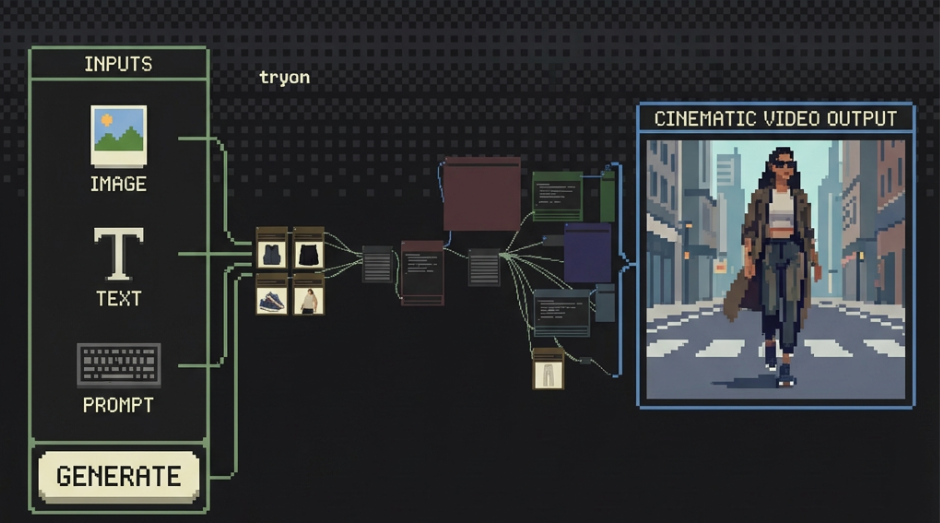
GMI Studioでは、次のことが可能です。
- 複数のAIモデルを組み合わせ、1つの統合されたワークフローを構築
- 入力、パラメーター、出力をワークフローの基本要素として定義
- ワークフローを保存、バージョン管理し、プロジェクトやチームをまたいで再利用
インフラやオーケストレーションを手作業で管理する代わりに、GMI StudioがAI制作のための本番環境対応基盤を提供します。
GMI Studioで現在利用できる機能
GMI Studioは、すでに実際のワークフローを提供するチームに利用されている、本番環境対応の機能を備えて提供を開始しています。
長尺動画生成(2分以上)
1枚の画像から、10種類の異なる動画スタイルでシネマティックな動画を生成できます。ストーリーテリング、マーケティング、クリエイティブ制作など、幅広い用途に対応します。
GMI Inferenceによる高速生成
競合サービスと比較して最大1.4倍高速な生成を実現。大規模な利用、信頼性、継続的なワークロードに最適化されています。
ワークフローの発見と再利用
組み込みのソーシャルフィードを通じて、コミュニティ内のワークフローを見つけ、「いいね」したり、再利用したりできます。これにより、イテレーションを加速し、重複した作業を削減できます。
大規模なクリエイティブワークフローに対応
GMI Studioは、プロフェッショナルなレンダリング、大規模シーンの生成、ECサイト規模のワークフローに対応するよう設計されています。
ゲームアセット向けの大規模な環境をレンダリングする場合でも、ECカタログ用に数千枚の商品画像を一括処理する場合でも、GMI StudioはノートPCやワークステーションでは処理が難しいワークロードに対応できるクラウドGPU上で実行されます。
Studioを利用することで、チームはローカルハードウェアの制約を超え、本格的な本番環境のスケールでAIワークフローを実行できます。
LoRAによる精密なスタイル制御
汎用モデルは強力ですが、プロフェッショナルな制作では、より高い精度とコントロールが求められます。
GMI StudioはLoRAを深く統合しており、マルチモーダルワークフローに詳細なスタイルやビジュアル上の制約を直接適用できます。
LoRAを活用することで、次のような一貫性を実現できます。
- キャラクターのビジュアルやテイストの統一
- ブランド固有のカラーグレーディング
- 独自の編集スタイルやモンタージュ表現
これらのスタイルをワークフロー内で組み合わせ可能な構成要素として活用することで、プロフェッショナル品質の出力を大規模かつ繰り返し生成できます。
毎回プロンプトを調整して一貫性を期待するのではなく、Studioによって再現性の高いクリエイティブコントロールを実現できます。
あらゆるワークフローをワンクリックで実行
複雑なワークフローだからといって、操作まで複雑である必要はありません。GMI Studioでは、すべてのワークフローをワンクリックで実行できます。
.png)
- 既存ワークフローをそのまま利用:手持ちのJSONファイルをドラッグ&ドロップするだけで、すぐに利用できます。
- 独自のライブラリを構築:カスタムワークフローを作成して保存できます。コミュニティでの共有機能は今後提供予定ですが、現時点でも独自の非公開ワークフローライブラリを構築できます。
- 複雑な配線作業は不要:バックエンドの接続や構成はGMI Cloudが処理します。ユーザーは「Run」を押すだけです。
実績あるインフラストラクチャを基盤に
GMI Studioは、主要なスタジオ向けに毎日数十億トークンを処理しているものと同じバックエンド、GMI Inference Engine上で稼働します。
これは本番環境向けに設計された実行環境です。Studioではリソース確保に悩まされることなく、以下の用途に対応する専用クラウドアーキテクチャを活用できます。
- 大規模なコンピューティングリソースを必要とするGPUベースのワークフロー
- 高速なイテレーションを可能にする高速生成
- 長時間の動画レンダリング中のクラッシュを防ぐ安定した実行環境
登録したすべてのユーザーに無料クレジットを提供しています。ぜひ今すぐお試しください。
今後の展開
GMI Studioは、クリエイター、開発者、企業それぞれのニーズに合わせて進化を続けます。ワークフロー共有、コミュニティでのワークフロー発見、ノードの自動配置などの新機能を、今年中に順次提供する予定です。
構築も、実験も、創作も、思いのままに。
よくある質問
1. GMI Studioとは何ですか?どのようなユーザー向けですか?
GMI Studioは、動画、画像、エージェントアプリケーション向けの本番環境レベルのAIワークフローを構築するチームのために設計された、ビジュアルなノードベースのプラットフォームです。すでに実際のAIプロダクトを提供するチームに利用されており、インフラ管理の負担を抑えながら、信頼性、スケーラビリティ、高速性を必要とするクリエイター、開発者、企業向けに設計されています。
2. GMI StudioはAIワークフローの構築をどのように簡素化しますか?
GMI Studioでは、コードを書くことなく複数のAIモデルを視覚的に組み合わせ、入力やパラメーターを定義し、出力をコントロールできます。プロジェクトごとにロジックを一から構築する代わりに、ワークフローを保存、バージョン管理、再利用、拡張することで、単発のプロンプトを継続的に活用できる本番環境向けパイプラインへと発展させることができます。
3. GMI Studioは現在、どのようなワークロードに対応していますか?
GMI Studioは、2分を超える長尺動画生成、大規模シーンのレンダリング、ECサイト規模のバッチ処理、プロフェッショナルなクリエイティブ制作パイプラインに対応しています。継続的かつ高負荷な処理に最適化されたクラウドGPUを活用することで、ローカルハードウェアの性能を超えるワークロードを実行できるよう設計されています。
4. GMI Studioは、大規模環境でどのように速度と信頼性を確保していますか?
StudioはGMI Inference Engineを基盤としており、競合サービスと比較して最大1.4倍高速な生成を実現します。安定したGPUベースの実行環境により、長時間のレンダリング中のクラッシュを防ぎ、高負荷なワークロードにも対応しながら、本番環境で一貫したパフォーマンスを提供します。
5. GMI Studioにはどのようなクリエイティブコントロール機能がありますか?
GMI StudioはLoRAを深く統合しており、キャラクターの一貫性、ブランド固有のカラーグレーディング、独自のビジュアルスタイルなど、精密かつ再現性の高いスタイル制御を実現します。これらのスタイルをワークフロー内で再利用可能な構成要素として活用することで、プロンプトを繰り返し調整することなく、一貫性の高いクリエイティブ表現を実現できます。
Colin Mo
Head of Content
Build AI Without Limits
GMI Cloud helps you architect, deploy, optimize, and scale your AI strategies
FAQ
GMI Studio is a visual, node-based platform designed for teams building production-grade AI workflows for video, image, and agent applications. It is already used by teams shipping real AI products and is built for creators, builders, and enterprises that need reliability, scale, and speed without managing infrastructure.
